In this blog post, an ePIC staff member shares her at-home mining experience. For clarity in this blog post, people or entities who are mining crypto are referred to as “miners”, and the machines that solve the algorithmic puzzles to earn the crypto are referred to as “rigs”. The intended audience for this post is the novice hobbyist who wants to start mining with the SC200.
Miner Profile
Name: Juno
Job: Marketing Staff at ePIC
Mining Experience: 5 months
Motto: It’s NEVER too late to start!
I have been in the industry for a year now since I have joined ePIC. As a newbie to the crypto scene, I thought it would be helpful for any aspiring home-miner to showcase my experience mining with SC200 Siacoin miner.
SC200 is a mining rig that mines coins on the blake-2b algorithm. For more information, visit epicblockchain.io
Electrical Requirements
This is probably the most math-intensive part of this blog. Before you even turn on the machine, first figure out the specifications of your electrical outlets.
Most homes have multiple outlets connected to one breaker. Traditional breakers can range from 10A to 20A in residential settings and different regions of the world have different AC Voltages ranging from 120V to 240V.
Then, it would be helpful to understand the miner’s power usage which can be found in the product specifications:
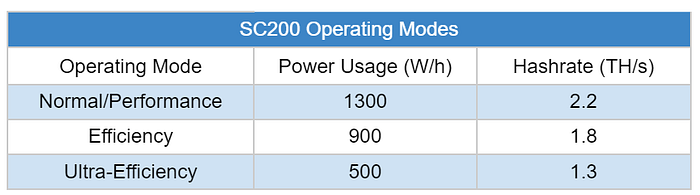
Note: the specs are subject to +/- 10% deviation.
I also had to find out the electric current of each outlet by looking at the breaker. The numbers are typically labeled on the switch:
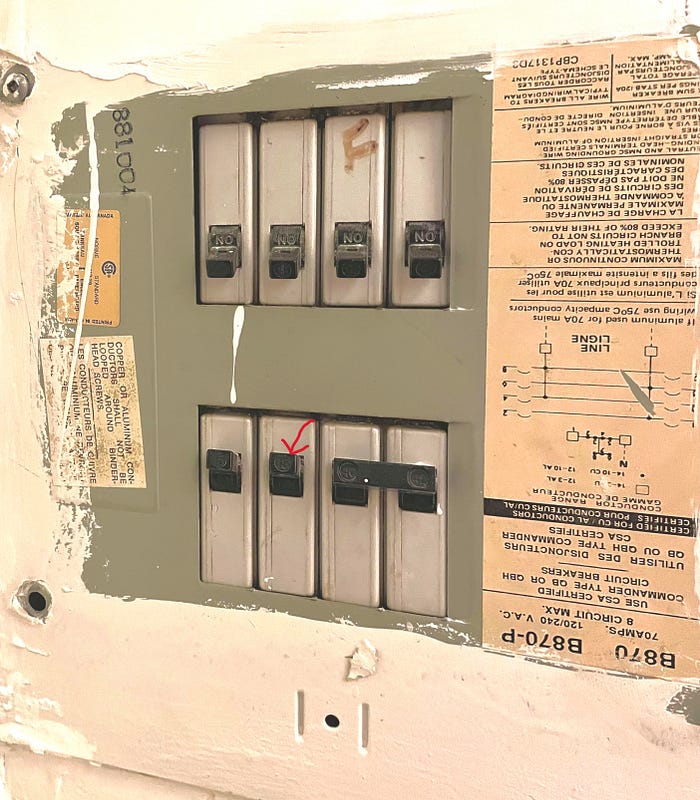
The first step is to calculate the wattage (or power), that the outlet can tolerate. The outlet I chose to plug the rig into was 20A. The max wattage is calculated with this formula:

P is the power consumption measured in watts (W), I is the electric current of the circuit measured in amperes (A), and V is the voltage measured in volts (V). The voltage in North America is 110 V.

My particular outlet can support the SC200’s highest operating mode, which is about 1300 watts.
If you have small appliances plugged into the same breaker, you may still be able to plug in your rig depending on the performance mode you choose. You need to ensure that the total power does not exceed the maximum wattage for the outlet.

For instance, if you have a hair dryer that uses 1000W and your outlet is 20A, and the voltage is 110V. Your rig can only go up to 1200W or otherwise, you would trip your breaker.

Setting Up the Rig
Instructions are available online and they are easy to follow. Basically, all I had to do was plug in a few wires and the rig would start running. It took about 15 minutes for the rig to calibrate, during which the fans can be a little loud. But once the machine has been calibrated, the fans will adjust according to your power setting.
Setting up Rig Configuration
I used the ePIC Dashboard to manage my rig. With the dashboard, I can tell the rig what mining pool to use, what wallet to mine to, and what mode to operate in. The SC200 does have periodic firmware and dashboard updates so be sure to check GitHub or your inbox for updates. Overall, it was pretty easy to set up. For SC200 users, you can email support@epicblockchain.io if you run into any issues.
Mining Pool
I personally use Luxor as my mining pool since they have a Bitcoin conversion product called Catalyst. If you would like to hold Sia, you can use other pools like siamining.com, f2pool, and DxPool.
Wallet
There are a few wallets that support Siacoin: Siacentral, Sia UI, and Ledger Nano S just to name a few.
Noise Level
As the power consumption goes up, the rig works harder, and the fans in the rig turn faster, resulting in an increase in noise level. In the 500W Ultra-Efficiency mode, which is the mode that I am personally comfortable with mining in my studio apartment, the noise level is negligible. If you put the rig in Efficiency mode in a separate room like a guest bedroom, you probably won’t be able to hear the rig unless you are Dolores from the Disney Movie Encanto.
Ease to Adjust Power Settings
With the ePIC dashboard, I could adjust the performance mode very easily. Sometimes I bring the operating mode up to 1000W Efficiency mode when I am not home (because of the fan noise) and down to 500W Ultra-Efficiency mode when I am home. Hopefully a scheduling mode will be added in the future to automate this process even further.
Electricity Cost
For me, a monthly cost of $30 CAD covers the electricity for mining, but if you are a renter and your utility fees are all included in your maintenance fees, then that’s even better! Go crazy on mining (but please don’t burn your home down).
Final Comment
The ePIC SC200 has been an effortless rig to use for home-mining. It doesn’t require getting electrical work done to operate if you are only running a few rigs, spreading things out in different outlets. If you are new to mining, the setup is foolproof. For me, the SC200 was very easy to navigate and allows for flexible options for a new home miner like me.
Disclaimer
By using this website and or blog, the user agrees as follows:
The information given to the user with the understanding that neither the author nor publisher is engaged in rendering any legal, business, or financial advice to the purchaser or to the general public. The views and opinions expressed are those of the authors and do not necessarily reflect the official policy or position of ePIC Blockchain. Any content provided by our bloggers or authors are of their opinion and are not intended to malign any religion, ethnic group, club, organization, company, individual or anyone or anything.
Although we make strong efforts to make sure our information is accurate, ePIC cannot guarantee that all the information on this website and or blog is always correct, complete, or up-to-date.